The first time an AI agent finishes a real task for you, you give it a second one. Then a third. Within a week you have one session benchmarking a parser, another drafting a release post, a third triaging literature, and a fourth watching a deployment.
You are no longer doing the work. You are doing something just as exhausting: you have become the router.
Regent is Suzent's answer to that ceiling. Instead of facing a sidebar full of parallel sessions and polling each one yourself, you talk to a single orchestrator that dispatches work across your projects and only comes back when a decision belongs to you.
Why "Regent"?
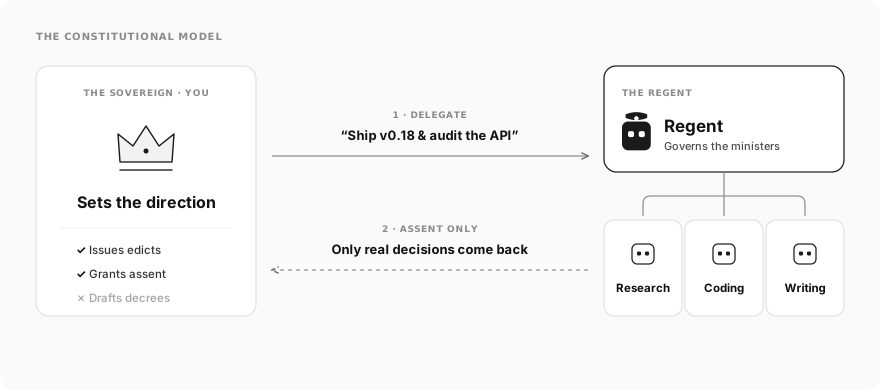
Historically, a regent governs a realm in the monarch's stead — handling the day-to-day administration of state, coordinating ministers, and bringing only matters of sovereign consequence to the crown.
In early builds of Suzent, this singleton chat was simply called SUZENT (and
in the codebase it still lives in suzent.core.focal_agent, with the fixed chat
ID focal-suzent). As multi-project workflows matured, the generic name hid
what made the role distinct: it is not "the main chatbot." You are the
sovereign; Regent is the executive layer that governs your autonomous sessions
while you focus elsewhere.
What Regent actually is
Instead of forcing you to act as a human router across a dozen tabs, Regent sits at the top of the desktop sidebar as a pinned card above your projects.
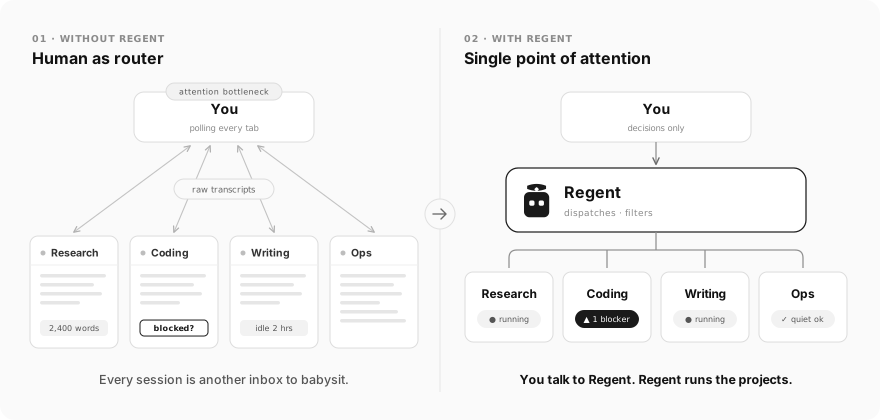
Three strict rules define how it operates:
-
A single point of attention. You do not juggle tabs for Research, Coding, Writing, and Ops. You talk to Regent in one continuous conversation, and Regent routes work to the right project behind the scenes.
-
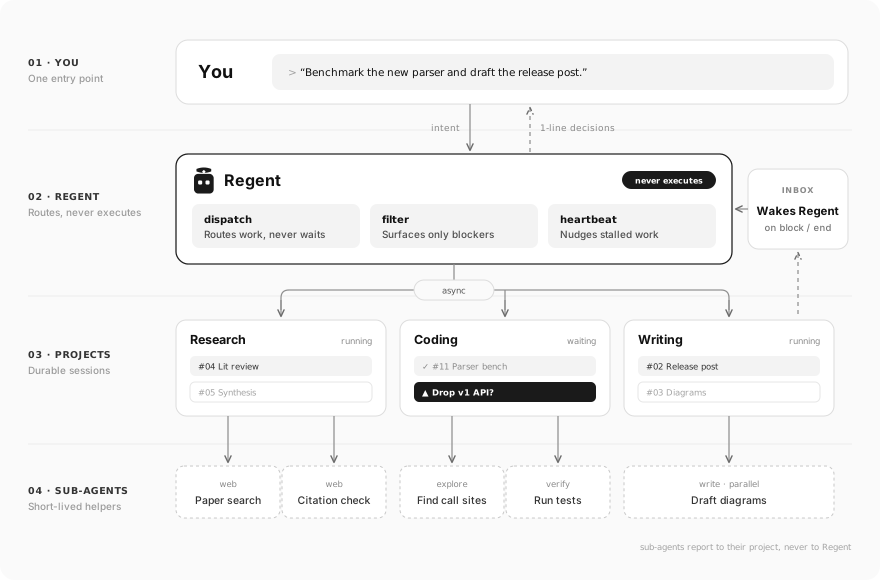
A dispatcher, never a doer. Regent does not write code, edit documents, or run shell commands. Those tools are stripped from its runtime policy. When you ask for project work, Regent uses
agent_dispatchto wake or spawn a primary session inside that project — or hand the job to a configured coding agent over the Agent Client Protocol (ACP). -
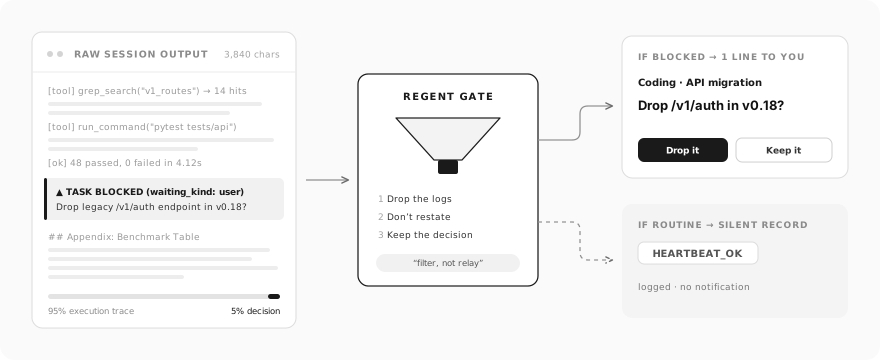
A filter, not a relay. When a project session finishes or hits a blocker, it reports to Regent's inbox. Regent never dumps a 4,000-character execution log into your chat. It distills the outcome to a single sentence — or, if nothing needs your input, records the completion silently without notifying you at all.
How is this different from sub-agents?
If you have used sub-agents in coding tools (including Suzent's own explore,
plan, write, verify, and web sub-agents), it is natural to ask: isn't
Regent just a parent agent spawning sub-agents?
No. They solve opposite problems at different layers of the stack:
- Sub-agents protect an agent's context window. When a Coding session
needs to grep 200 files or run a noisy test suite, it spawns an ephemeral
exploreorverifysub-agent via theagenttool. The sub-agent does one bounded job, keeps the raw tool output out of the parent's prompt, returns a summary to that parent session, and terminates. You still had to open the Coding session and tell it what to do. - Regent protects your attention. Regent sits above projects. It does
not spawn throwaway workers for a single turn; it dispatches to durable
Project Primary Sessions that own a folder, a
context.mdlibrary, and a long-running task board — and those project sessions, in turn, spawn their own sub-agents while they work.
| Dimension | Sub-agents (agent tool) | Project Primary Sessions | Regent (focal-suzent) |
|---|---|---|---|
| Core purpose | Protect a session's context window & run parallel steps | Execute durable work inside one project | Protect your attention across all projects |
| Scope | Single task inside one parent session | One project (context.md, workspace, tasks) | Every active project in Suzent |
| Lifespan | Ephemeral (one bounded job, folded under parent in sidebar) | Long-lived conversation across days or weeks | Permanent singleton pinned at the top of the sidebar |
| Who talks to it | Its parent project session | Regent (via agent_dispatch) or you directly | You (and project sessions reporting back) |
| Execution tools | Scoped preset (explore, write, verify, web) | Full project toolset (files, bash, MCP, sub-agents) | None — orchestration & read-only lookup only |
| Blocking behavior | Can run synchronously or wake its parent session | Pauses on ask_question, tool approvals, or blocked tasks | Never waits on a turn; filters inbox events for you |
Put simply: a project session uses sub-agents to divide labor; you use Regent so you don't have to manage the project sessions.
Filter, not relay
Most multi-agent setups fail at the last mile: five agents do five things in parallel and then reward you with five walls of text to read.
Regent's system prompt gives it a harder job: "You are a filter, not a relay."
Every event that reaches Regent's inbox — a reply to a dispatched task, a session
closing its last open task, or a task marked blocked on user input — passes
through two branches:
- If a session blocks on a decision, Regent surfaces one line: which project, what is stuck, and the exact choice it needs from you.
- If a session finishes cleanly, Regent replies with the quiet token
(
HEARTBEAT_OK). The event stays in Regent's history so it can answer questions about it later, but no desktop notification fires and the unread badge does not move.
Enforced boundaries, not polite prompts
If you give an orchestrator agent a bash tool and a file editor, it will eventually stop orchestrating and start doing the work inline — polluting your main conversation with half-finished diffs and command output.
Regent's boundaries are enforced in code before every turn
(apply_focal_tool_policy()):
- Write and execution tools are stripped.
FOCAL_TOOL_NAMESequips only agent discovery/dispatch, memory/session search, web lookup,ask_question, read-only file tools, wake-up scheduling, and Regent's own notes tool. Every other tool is placed intodenied_toolsso it cannot even be discovered via tool search. MCP servers and working directories (cwd) are removed. - Zero-cost background check-ins. Regent runs a built-in 30-minute heartbeat
to spot sessions that have stalled with open tasks (idle for 30+ minutes) or
blockers you haven't answered in two hours. Before calling any model, Suzent
hashes the current findings in Python (
should_run_focal_heartbeat()): if nothing is stuck or the state hasn't changed since the last check-in, the turn is skipped in code. A quiet afternoon costs zero tokens.
Project isolation without context bleed
Because Regent never executes project work itself, each project keeps its own
working directory, task list, and context.md cleanly separated. Your coding
session's stack traces never leak into your research project's literature notes,
and neither clogs your conversation with Regent.
When you do want to inspect the raw work, Regent's board groups every project session by where it stands for you — waiting, running, idle, or resolved — and opening any session from the board gives you a one-click tag in the header to jump straight back to Regent.
A COO, not another chat tab
The right mental model for Regent is a Chief Operating Officer. You do not walk from desk to desk checking who is stuck; you state the objective once, let the teams work in their own rooms (with their own sub-agents), and expect to be interrupted only when a call is genuinely yours to make.
Regent is a desktop feature today — the pinned sidebar card, the cross-project
board, and the focal-suzent conversation live in the desktop app. The
principle behind it is the core of how Suzent scales: sub-agents scale a
session's execution; Regent scales your attention.
Quickstart · Focal Agent Architecture · Source (Apache-2.0)